
A practical guide
How to Make a Cartoon Video with AI
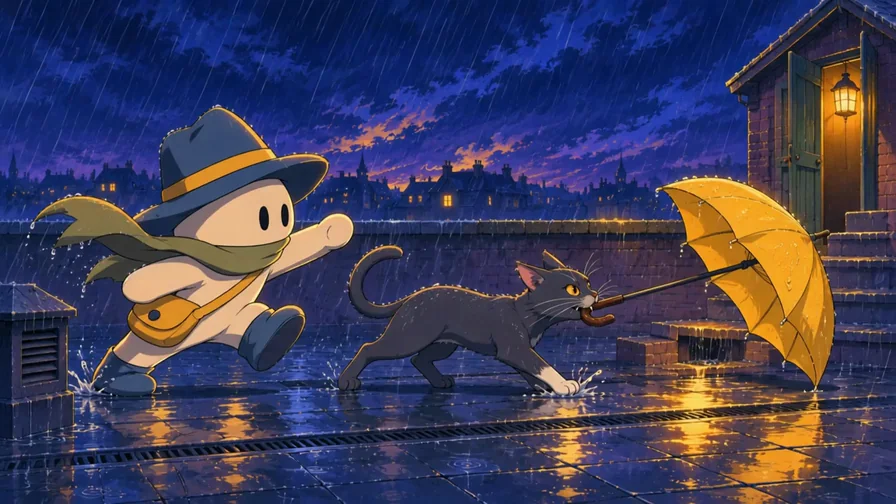
Start with what your character wants. In the cartoon below, a chase changes direction the moment the keeper sees who needs the umbrella.
Sign in to see the generation options and credit cost for your draft.
Write one action the viewer can see
Pick a character, a place and a goal. Show the keeper reaching for the stolen umbrella so viewers understand why the chase starts. Give the scene an ending the viewer can see.
A prompt template you can reuse
In [place], [character] tries to [goal]. When [something gets in the way], [show what the character does next]. End with [one clear image or action].
Worked example from The Umbrella Thief On a rainy rooftop, a charcoal cat snatches the lantern keeper’s yellow umbrella. The keeper chases it and discovers a shivering kitten under the canopy. As rainwater rushes toward them, the keeper braces the umbrella against the water, scoops up the kitten and follows the cat into a warm stairwell.
The keeper stops chasing the umbrella when they see the kitten. Showing what the keeper sees makes that change easy to follow.
Set up the draft in the editor
- Open the cartoon video editor and paste your prompt into Your idea or script.
- Under Choose a cartoon style, select Anime to follow the sample’s look. See the 2D cartoon animation guide for flat colors and pencil lines, or the 3D cartoon style guide for rounded shapes and lighting.
- Set Video length to 5 sec for one action or 30 sec to draft a story with several beats. In Format, choose 16:9 for a landscape frame like the sample or 9:16 for a vertical draft.
Draft in this tab. To save the story to your account, sign in and choose Save my story.
Use the whiteboard animation guide to plan a drawing in steps or the anime video guide to stage a quick action scene.
Break the story into visible beats
Write one line per beat and say what changes on screen. Read them in order to see if the action makes sense. Keep the character’s colors and props consistent from shot to shot.
- The umbrella goes missing
- A gray cat runs off with the yellow umbrella. The keeper follows across the roof.
- Under the umbrella
- The keeper sees the gray cat sheltering a wet kitten.
- Water rushes in
- Runoff surges across the roof. The keeper turns the umbrella toward it.
- Two hands for the kitten
- With the canopy blocking the water, the keeper lifts the kitten with both mittens.
- Head for the warm light
- The keeper carries the kitten up the stairs, leaving the overturned umbrella in the rain.
- Dry at last
- The keeper adjusts a wet hat as the kitten nestles close.
See the timed frames from the finished video and compare each caption with what you see in the cartoon.
Try the story, images and video demo
Open the interactive demo and choose See the story outline. Select Use this story and click any frame for a closer look. Then choose Use these images and Open sample video. You can watch or download the finished film.
The demo plays the film we prepared for this exercise. You can try it without signing in or spending credits.
Try a scene of your own
Try a scene you could show in one shot, such as a dog carrying a shoe through the rain.